
Guide

All kinds of people get into wall printing. Some already have a business, clients and a knack for selling. Others want to start with solid foundations and learn the ropes first. And some are planning big projects from day one.
We’ve helped more than 400 businesses in 21 countries get off the ground. We know everyone comes to us with different experience and a different plan. That’s why we’ve built three packages: Basic, Standard and Premium. Every one of them includes the wall printer⁺ pro – what changes is the amount of training, equipment and support. You decide how much of it you need.
Where are you right now? Do you already have clients and know how to sell? Are you just starting out and want to enter the market well prepared? Or will wall printing be your main line of work? Wherever you are, there’s a package with the right level of support for you. Below, we walk through each one step by step. The decision is yours – and we’re right here with you.
What to consider before choosing a wall printer package

Before you dive into the equipment lists, take a moment to think about what you actually need. Asking “Which package is the best?” gets you nowhere. A better question is: “What do I need to get started my way?” Think about the following.
- How do you find clients and promote your services today? If you already have methods that work, you may mainly need the equipment and the technical basics. If you’d like to sharpen or expand your marketing know-how, extra materials will come in handy.
- Do you have a client base you could offer wall printing to? Do you run a renovation, advertising or branding business with clients who already order from you? Think about who you could show wall printing to on day one. Maybe your regular clients? If you have a group like that, you can start by talking to them. If you’re still building it, look at which packages will help you land your first jobs and show off your service.
- Do you have hands-on experience with wall printers? If so, you may mainly need tutorials and checklists to quickly refresh the steps. If it’s all new to you, think about how you’d like to learn: on your own from materials, at a live training session, or with the option to ask quick questions on a technical support chat.
- How do you plan to print: now and then, alongside your current business, or every day as your main job? What kind of jobs do you want to take on: small or large? If most of them will be small, the standard print speed will be enough. If you’re planning large projects or several jobs a day, a faster print head may make a real difference.
- How do you like to learn: on your own and at your own pace, or with other people? And when are you likely to need help: during the working week, or in the evenings and at weekends too? Your answers will show you how much training and which support hours will suit you best.
There are no wrong answers. They simply decide which parts of a package matter to you and which matter less. Jot your notes down, even on your phone. We’ll come back to them in the section on making a decision. Now it’s time to look at the packages, starting with Basic.
Basic package: the equipment for those who’ll build the rest themselves
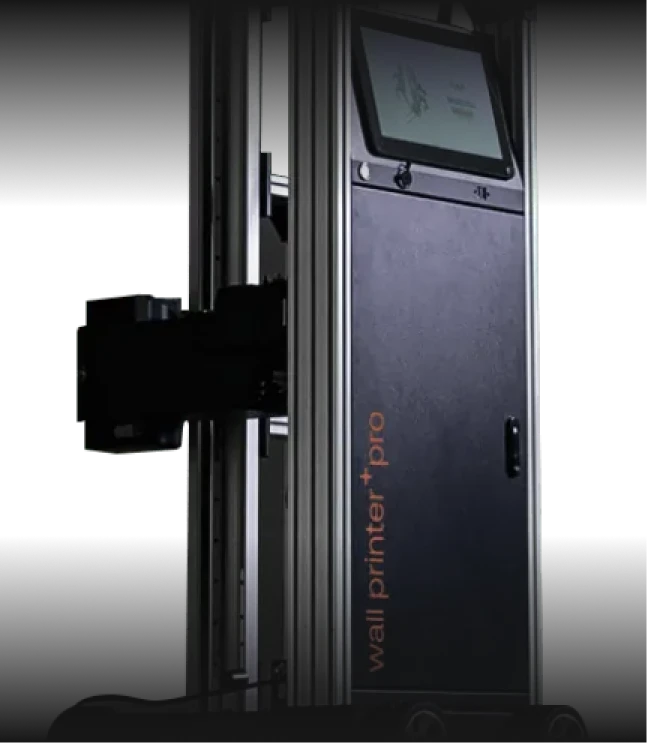
With the Basic package, you get the wall printer⁺ pro with an Epson F1080 print head. It prints reliably at up to 1 m² per hour and works well for designs up to about 3 m². Large walls need a bit more attention, such as breaks for flushing. If you’re planning jobs like that, you can add the faster Epson i3200 print head to your package for an extra fee.
Along with the machine, you get everything for your first jobs: ink for about 150 m² of printing and a year’s supply of consumable parts. On top of that, you’ll receive guide rails (3×100 cm), MainTop RIP software for preparing your designs, and a print head case that makes storage and transport easier.
So how will you learn to use it? Through a recorded video training course and tutorials. You can go back to them at your own pace, whenever you need. And if a question comes up, there’s always someone to message. Our technical support chat replies in under 3 minutes and is open on weekdays from 8:00 to 16:00. You’ll have access to it for a year. On top of that, you get a 24-month warranty.
Who is Basic a good fit for? Someone starting out with their own business experience: they know how to reach clients and talk about what they offer, they’re comfortable learning something new on their own, and they know what day-to-day life as a business owner looks like. Picture a renovation or advertising company adding a new service to what it already does. It knows how to sell it. What it mainly needs is the equipment and solid technical foundations. For a business like that, extra courses and materials may simply be unnecessary.
Basic may not be enough if you’re still building your skills and want more preparation before you start. The same goes if you plan to work more intensively.
One thing we want to make clear: choosing our first package doesn’t mean you’re on your own. You get training on how to use the printer, you get support, you get a warranty. The package simply has fewer extras designed for specific needs.
Standard package: a solid start with business tools

The Standard package includes everything in Basic. On top of that, it adds live training and a course that prepare you for your first jobs, on both the technical and the business side.
The first difference is in-person training in Szczecin, Poland. It’s a full-day session led by Krzysiek, head of the wall printers⁺ technical team. Does operating the printer seem complicated? Once you see it in action, many of those doubts will disappear. In fact, more than 98% of participants would recommend our training to others. You work on the actual equipment, not slides, focus 100% on practice, and leave with a Wall Printing Certificate that confirms your new skills. You can also bring one person along at no extra cost, such as a business partner or an employee.
Running the machine is one thing; running a wall printing business is another. That’s why Standard also includes our online course, How to Make Money with Wall Printing. You’ll learn how to put together a business plan and where to start with marketing. You’ll also pick up practical ways to find clients and handle sales conversations.
A common challenge when you’re just starting out? Having no projects of your own to show your first clients. That’s why we give you a set of professional photos and videos from 10 of our own projects, licensed for use in your ads and on social media. This means you can start promoting your business before your printer even arrives.
The package also includes a year’s access to our private community. It’s a group of more than 400 wall printing professionals who deal with the same challenges as you every day. Stuck in the middle of a job? Ask on Slack and get an answer within minutes. Pricing, a tricky surface, choosing equipment – you can bring any of these to people who’ve been there before.
On top of all that, Standard comes with a few practical upgrades: an automatic print head flushing system that reduces the risk of the nozzles drying out, an extended set of rails (5×100 cm), and a vertical extension (a way to extend your printer’s reach upwards).
This package is for you if you’re new to wall printing and want to start well prepared: learn to use the printer hands-on, create your first plan for finding clients, and get materials to show off your service. You get the knowledge, the portfolio and the people to help you get going. You handle the client conversations – and we’re right here whenever you need support.
And if you’re thinking about working at a larger scale and need more support, take a look at what Premium offers.
Premium package: full onboarding and maximum support for working at scale
Premium includes everything in the Standard package. It adds the things that count when you’re working intensively and taking on bigger jobs.
Let’s start with the print head. Here, the package comes with the Epson i3200, which prints at up to 2 m² per hour – twice as fast as the F1080. With Basic and Standard, you can add it for an extra fee. It’s simple maths: with the Epson i3200, a 10 m² job takes 5 hours instead of 10. With several larger projects a week, that difference really adds up.
Support goes further too. The Premium technical chat is open from 8:00 to 22:00, seven days a week, so you can get help in the evenings and at weekends as well. You also get an extra 12 months of warranty (36 months in total instead of 24).
With Premium, you also get transport bags that protect the machine on the way to a client, advanced FlexiPrint RIP software, and an extended set of vertical extensions (2×100 cm, 1×50 cm, 1×40 cm, 1×30 cm and 1×20 cm) for tall walls. On top of that, there’s a regularly updated portfolio of 25+ projects, a 20% discount in our online shop for 12 months, and a website for your business.
This package is for you if wall printing will be your main line of work, you’re planning large projects, or you need support in the evenings and at weekends too.
Is the most expensive package always the best? Not necessarily. Before you choose it, ask yourself one question: will I actually use everything it offers day to day? Your answer will tell you whether this package makes sense for you.
How do the packages differ and how do you decide? Equipment, training and support compared
Let’s go back to the notes you made at the start of this article. Now compare them with the packages. You can do it in four steps.
- Work out what you already have: clients, sales skills, or maybe technical experience? Be honest – don’t sell yourself short, but don’t overestimate either.
- Name the gaps. What’s missing before you can launch your service? Training, materials, more support?
- Match your gaps to what’s in each package. See which set fills them.
- Decide which differences you’ll actually feel. A faster print head won’t help if you’re not planning big jobs. A course may not be much use if you’ve already got sales covered.
In the table below, we compare the packages across the same categories, including equipment, training, support and warranty. We compare what’s included without judging which option is better – that’s up to you.
| Basic | Standard | Premium | |
|---|---|---|---|
| Equipment and print head | wall printer⁺ pro; F1080 print head (1 m²/h) or i3200 (2 m²/h) available for an extra fee; MainTop software | As in Basic | Epson i3200 print head (2 m²/h) as standard; FlexiPrint software |
| Consumables | Ink for approx. 150 m² of printing; consumable parts for a year; print head case | As in Basic, plus cleaning solution and automatic print head flushing system | As in Standard |
| Learning and training | Video tutorial library, checklists, online training | As in Basic, plus in-person training with certificate | As in Standard |
| Business resources | – | Online course How to Make Money with Wall Printing | As in Standard, plus a website |
| Portfolio and community | – | Portfolio of 10 projects; wall printing community (12 months) | Portfolio of 25+ projects (regularly updated); wall printing community (12 months) |
| Support | Technical chat, weekdays 8:00–16:00 (for a year) | As in Basic | Premium technical chat, 8:00–22:00, 7 days a week |
| Warranty | 24 months | 24 months | 36 months (24 + 12) |
| Additional equipment | Guide rails 3×100 cm | Guide rails 5×100 cm; vertical extension 1×100 cm | Rails as in Standard, plus 1×50 cm and 1×25 cm; vertical extensions 2×100, 1×50, 1×40, 1×30, 1×20 cm; transport bags; 20% discount in our online shop (12 months) |
Still unsure after looking at the table? Every situation is a little different, and sometimes it’s easier to talk it through than to compare columns on your own. If that’s you, get in touch. We’ll match your answers to the packages and help you sort it all out. The decision stays with you.
Summary: choose the package that fits your business
Let’s pull it all together. The packages differ in how much equipment, preparation and support they include – not in quality. Basic gives you the hardware and technical foundations. Standard adds preparation for your launch. Premium expands what you can do day to day and how much support you get. The right choice depends on what you already have and how you plan to work.
Already have your own clients and sales skills? The basics may be all you need. Want to get ready on both the technical and business side before your first job? Take a closer look at the wider package. Planning to work intensively on large projects? See what Premium has to offer.
If you’d like, we can go through it together. Tell us how you work, what you already have and what’s missing. We’ll work out which option makes sense for you – with no pressure to pick a particular package.
Leave your details in the form. We’re here to help you decide.
Not sure if this business is for you? Want to know the details or get started right away?
Discover the collaboration opportunities available to you and learn how to get started—even if you lack capital, a business of your own, experience, or prior knowledge. We will teach you everything.
See more
[ratemypost]
Blog
Explore our resources
Have a look through our knowledge base. We’ve put together articles, videos and answers to the questions people ask most before getting into wall printing.
Our process
Discover our collaboration process
Take the first step and we’ll do the rest
Send the form and we’ll email you our price list straight away, with all the packages and what’s included. One of our advisers will be in touch within one working day. No hard sell, just answers to your questions.

Your data is safe
Step 1: Choose your location
Step 2: Fill out the form